

3.1. Nodes and Topics#
In the introduction to this chapter we stated that nodes are independent processes that perform specific computations.
A more intuitive approach would be to think about ROS nodes as the individual members that make up a group working together to complete a task. In this case, the group is a robot.
In this team, each member (node) has a specific job, such as driving, observing, or making decisions, just as each node in ROS has a specific task to handle.
Each team member works independently but can communicate with others to share information or request help. Similarly, a node is an independent unit/process/executable that runs separately from other nodes but can send and receive messages.
3.1.1. How and Why to Use Nodes in ROS2#
The official ROS2 site suggests that “each node should be responsible for a singular, modular purpose.” This makes the code for a robotic system more flexible, scalable, and easier to maintain and reuse.
For example, one node could be responsible for collecting sensor data (such distance data from a LiDAR sensor), another node could be responsible for processing that data, and another node could be used for controlling the motors.
 ROS2 Node Graph (Courtesy of ROS2 Documentation)
In this way, nodes enable parallel processing, allowing different tasks to run independently, promoting modularity and reusability in different projects.
3.1.2. Communication Between Nodes#
As you have seen in the example above, nodes do not operate in isolation. They communicate with each other using topics, services, and actions. These concepts will be covered further in the following sections.
First, it’s important to understand how information is transmitted between nodes using messages.
Messages are the building blocks of communication in ROS2. They are the primary mechanism by which nodes exchange information. A message is a structured data format that contains specific fields for data values, allowing nodes to share information in a consistent and standardized way.
For example, a message could contain:
A single value (such as a temperature reading).
Multiple fields (such as a point in 3D space represented by X, Y, and Z coordinates).
Complex nested structures (such as data about a robot’s position and orientation).
The structure of a message is defined in its .msg file. These files describe the types and format of the data in a message. For instance, a message could contain the following:
int64 x
int64 y
int64 z
The above .msg file defines a message with three fields: X, Y, and Z, all of type int64.
3.1.3. Topics and Messages#
When a node wants to send data, it publishes a message to a topic. Other nodes that need this data will subscribe to the same topic to receive the messages.
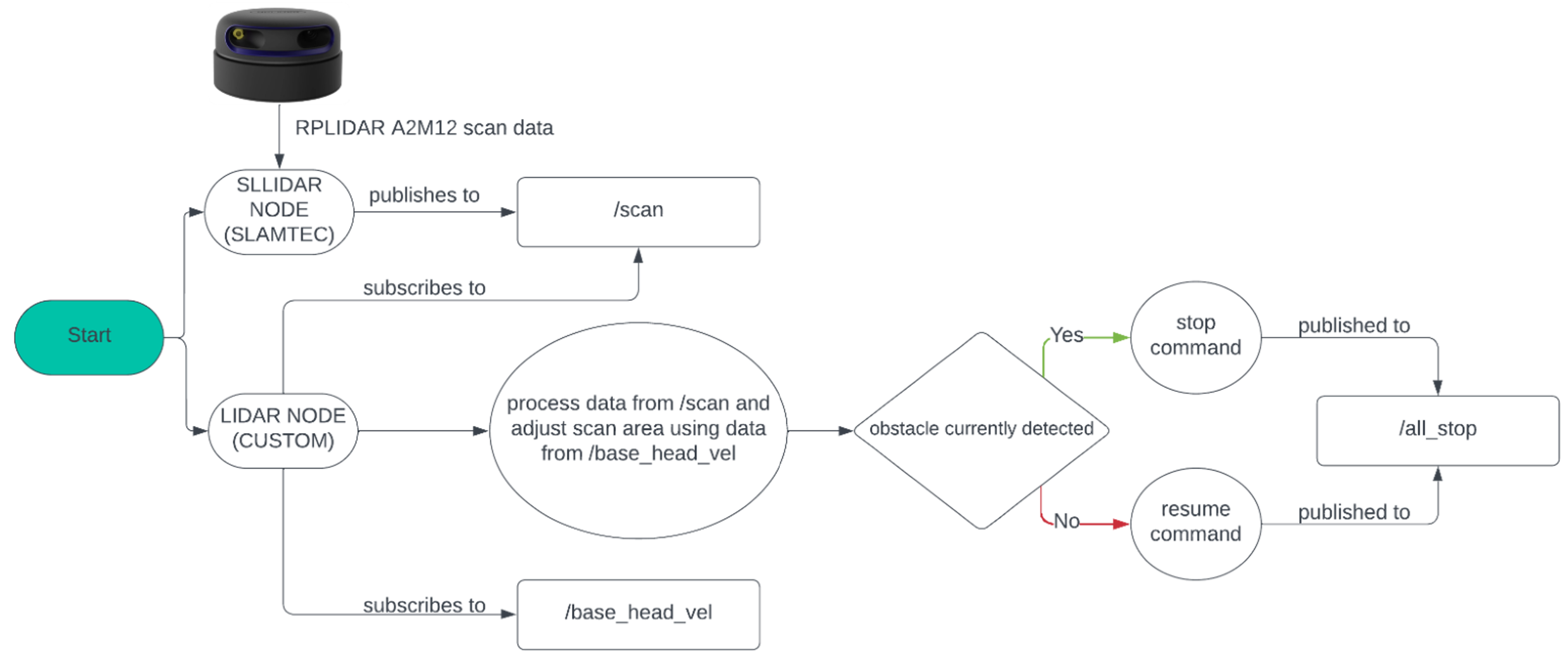 Nodes Communicating via Topics - Spring 2024 Capstone Team
The example image above depicts the logical flow of a program designed to control a LiDAR sensor. The program executes three key tasks: scanning the environment to gather data, processing that data, and making decisions based on it.
The process hinges on two primary nodes:
SLLIDAR NODE The SLLIDAR node interfaces directly with the physical LiDAR sensor, collecting raw sensor data. It then processes this data into structured information formatted as scan messages. These messages are subsequently published to a topic named /scan (represented in the diagram as a rectangular block labeled “/scan”). This enables other nodes to access the processed scan data.
LIDAR NODE The LIDAR NODE subscribes to the /scan topic, receiving the published scan messages. It further processes this information to interpret the scanned environment. Based on the analysis, the LIDAR node sends commands to another topic, enabling the robot to take specific actions or make decisions.
As you have just seen, this communication structure facilitates a modular approach to robotics programming, where nodes operate independently while sharing information through topics.
3.1.4. Best Practices for Nodes#
Now that you have a fundamental understanding of nodes, topics, and messages, you can begin to explore how to structure and implement your own nodes effectively.
It is important to keep in mind that writing nodes is more than just getting them to work; it is about ensuring they are efficient, reliable, and easy to maintain. In the following sections of this book, you will be guided through writing ROS nodes. As you do so, it is best to keep in mind a few good practices that will help you build scalable and modular systems:
1. Design Nodes with Clear Responsibilities: Avoid overloading a single node with too many tasks. If your program involves several functionalities working together (as most programs do), divide the subsections of the program into executable components that can be handled by separate nodes.
2. Write Reusable and Scalable Code: Ensure your nodes can be adapted to new features or systems.
3. Effective Debugging: Write your nodes to provide meaningful feedback during development and runtime.
4. Use Parameters and Configuration Files: Make your nodes flexible without modifying code for different use cases.
By adhering to these principles, you will not only create functional nodes, but also build a foundation for robotic systems that are easier to troubleshoot, extend, and collaborate on with others.